
Finding Data#
How to find records stored in LinkAhead.
How to filter results by their properties
How to filter results by their by relations to other records.
This tutorial covers the basics of searching for data in LinkAhead. For more in-depth explanations, you may also look at the query overview page, and if you want to get results in tabular form, refer to the tutorial Get tabular data in LinkAhead.
Tip
In the past, “LQL” was called “CQL”. There may still be instances where the old term is used.
Prerequisites#
You need access to the web interface of a LinkAhead instance with the demo data.
For example the demo server at https://demo.indiscale.com.
Alternatively you can use a LinkAhead instance which you installed locally or which was provided by your university or company. In this case, if your instance does not contain the data used in the LinkAhead demo, you will need to adjust the queries to match your own data.
As no data will be added or updated in this tutorial, read‑only access is sufficient.
Make sure you can open the LinkAhead web interface and see the query field at the top of the page (before you start typing any query).
First steps with LinkAhead Queries#
The semantic data model of LinkAhead allows efficient data access. We use the LinkAhead Query Language (LQL) to search the data. You can enter queries directly in the webinterface:

Search bar in the web interface#
Our first query#
Let’s start with a simple one:
FIND MusicalInstrument
You should now see the musical instrument Records which are stored in LinkAhead:
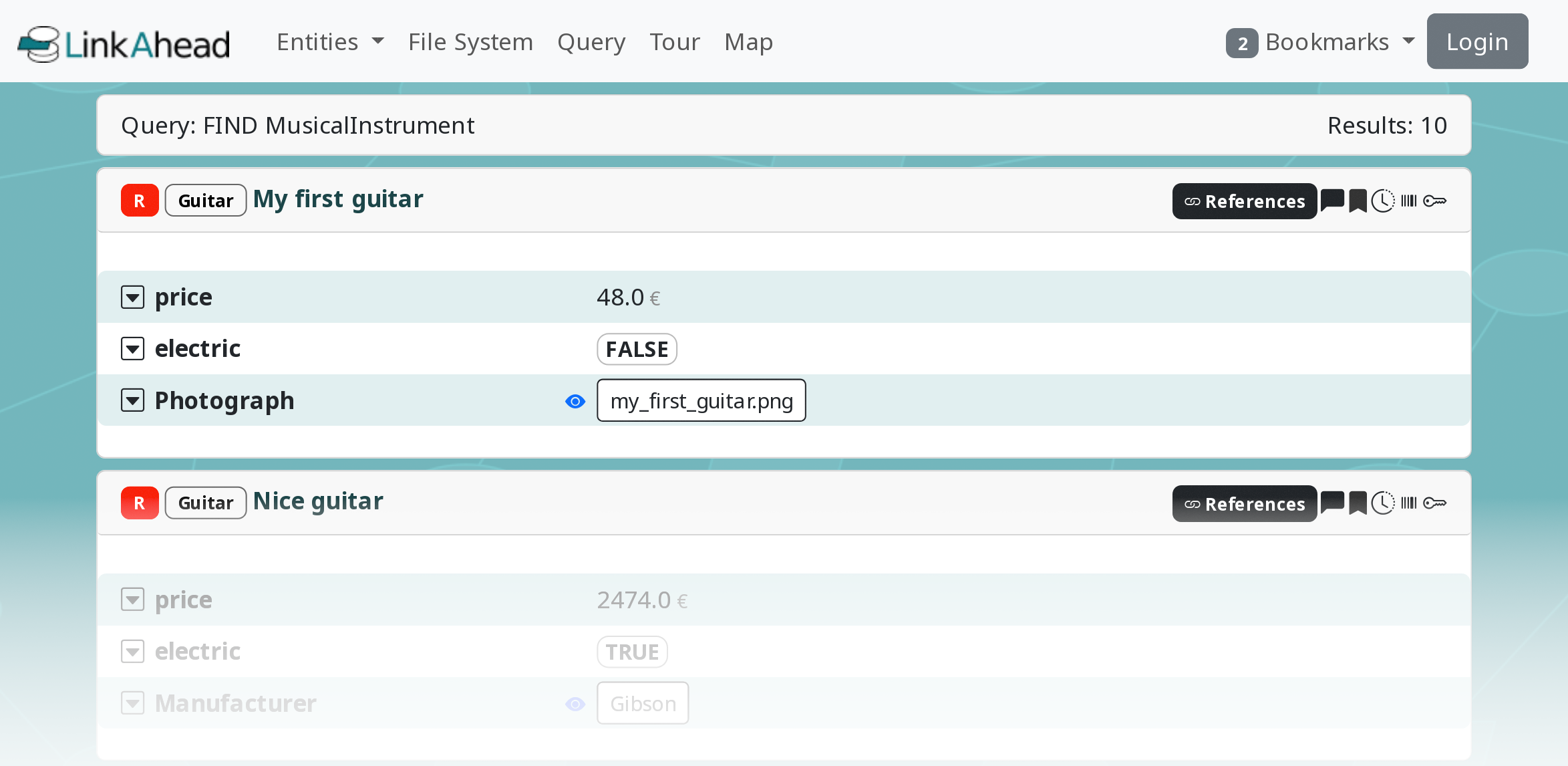
Search results in the web interface: A few musical instruments#
Explanation
Most queries simply start with the FIND keyword and describe what we are looking for behind
that. Then, we provided a RecordType name: MusicalInstrument. This means that we will get
all records that have this RecordType as parent.
There are more Entities than Records#
Now try out the next query:
FIND ENTITY Guitar
Explanation
When we add the ENTITY keyword we will get every entity that is a
Guitar – also the RecordType, and even a Property with that name if there
exists one. Using FIND RECORDTYPE Guitar would restrict the result to
only that RecordType. And FIND RECORD MusicalInstrument is equivalent
to FIND MusicalInstrument.
Note, that you can provide not only RecordType names after the FIND, but names in general:
FIND "Nice Guitar"
This will give you a Record with the name “Nice Guitar” (this one exists in the
demo instance). Quotes "..." are necessary if the name contains spaces.
There are some features that make it easier to use names in queries:
The LinkAhead Query Language is generally case insensitive.
You can use
*to match any string:FIND Nice*orFIND RECORDTYPE Musical*.In the webinterface, after typing three letters, names that start with these letters will be suggested by the autocompletion.
Exercise
Predict the result of the query before you run it. This helps you get a feeling for the filters.
Filter your search results with Properties#
Looking for entities with certain names or such that have certain parents is nice. However, the queries become really useful if we can impose further restrictions on the results. Let’s start with an example again:
FIND Guitar WITH price > 10000
This will list expensive guitars that are in the demo instance.
Explanation
Here we are using a property (the price) of the Guitar records to restrict the
result set. In general such a restriction or filter looks like:
FIND <Name> WITH <Property Filter>
Typically, the filter has the form <Property> <Operator> <Value>,
for example length >= 0.7mm. Instead of the <Name> you can also use one
of the entity roles, namely RECORD, RECORDTYPE, FILE, PROPERTY,
or ENTITY.
See also
There are many filters and operators available. You can check the query language specification for a comprehensive description of the available filters. In this tutorial, we will only look at the most common examples.
Tip
Note that in the above example the value of length has a unit mm while in the previous example
the value 10000 did not have a unit. However, units are not covered by this tutorial.
If you want to find records which have a certain Property, but you are not interested in the Property’s value, you can use:
FIND MusicalInstrument WITH Manufacturer
This returns all MusicalInstrument records which have a Manufacturer as a property.
Similarly to using incomplete names, you can use LIKE and * to match parts of text properties:
FIND RECORD WITH serialNumber LIKE KN*
There is large number of operators that can be used together with dates or times. One of the most useful is probably:
FIND RECORD WITH date IN 2019
Here the date must be in the year 2019, but the month and day are irrelevant.
References between Records#
A lot of valuable information is often stored in the relations among data, i.e. in the references of entities. So how can we use those? Try it out:
FIND RECORD WHICH REFERENCES A Guitar
This returns all records which reference a Guitar Record. And it is also
possible to check for references in the other direction:
FIND RECORD WHICH IS REFERENCED BY A Analysis
You can also provide the ID of an entity to find referencing records:
FIND RECORD WHICH IS REFERENCED BY 112
Using multiple filters#
AND / OR#
Often, one filter is not sufficient. Thus multiple filters can be combined:
FIND <Name> <Property Filter 1> (AND|OR) <Property Filter 2>
Try this out for yourself and enter this search query:
FIND Guitar WITH price>48 AND electric=TRUE
This example returns all guitars that are electric AND have a price above 48.
Tip
The query language also supports clustering filters with parentheses, but this is not covered by this tutorial.
Nested reference filters#
Furthermore, reference filters can be nested:
FIND <Name> WHICH REFERENCES <Name> WHICH REFERENCES <Name>
An example with two hops, Manufacturer ← referenced by Guitar ← referenced by MusicalAnalysis
records:
FIND Manufacturer WHICH IS REFERENCED BY Guitar WHICH IS REFERENCED BY MusicalAnalysis
Just the numbers, please: Count results#
Using COUNT instead of FIND will only return the number of entities in the result set:
COUNT Guitar WHICH IS REFERENCED BY MusicalAnalysis
Tip
This is often useful when experimenting with queries. Getting only the number of results can be faster than returning all the results.
Next steps#
Congratulations! You finished the tutorial Finding data in LinkAhead.
Next, you may be interested in the tutorial Get tabular data in LinkAhead, where you will assemble your own data tables and download the results, so you can analize the data with your day-to-day tools.
There is also more in-depth information about LinkAhead queries in the query overview page.