
The LinkAhead Query Language#
What to expect
Read this page if you want to acquire a systematic, basic understanding of LinkAhead’s query language (LQL).
The LinkAhead Query Language (LQL) is a search language which can be used to ask LinkAhead for data. It is deliberately close to natural English, case‑insensitive, and built around a few simple structures.
For the full syntax with all details, read on in the LinkAhead Query Language Syntax reference.
Tutorials for a hands-on experience of the query language are provided in the web interface tutorial chapter, starting in the subchapter “Finding data”.
LQL overview#
The main keywords in LQL are:
Keyword |
Effect |
|---|---|
|
Return matching entities (Records, RecordTypes, Properties, …). |
|
Return only the number of matching entities. |
|
Return results as a table (specific properties in columns). |
|
Add property filters (e.g. |
|
Add reference filters (e.g. |
|
Add backwards reference filters. |
An LQL query has three main parts, which will be explained in more detail in the following sections. These parts are:
- Query type
The first keyword in the query specifies whether the result shall be the number of matches, a list of entities or a table.
- Entity expression
The entity expression specifies the kind of entities we are interested in. This may be all entities, or only a subset, such as Records or RecordTypes. Additionally, the name of the entity can be given, either literally or with wildcards (
Sample*).- Filters
Use
WITH,WHICH REFERENCESorWHICH IS REFERENCED BYto further filter the results. This part is optional, but will be used in nearly every query in practice.
By combining these parts, an LQL query can be created. This means Queries in the LinkAhead Query Language are structured in the following way:
Note
LQL is case‑insensitive. Keywords are shown in all caps for readability, but find sample works
just as well as FIND Sample.
Query types#
LQL supports three top‑level query verbs: COUNT, FIND and SELECT. This verb determines the *
shape of the result* that the server returns. The rest of the query syntax, entity expression and
filters, is the same regardless of the used query type.
Typical use cases for the query types are:
Query type |
Typical use case |
|---|---|
|
Query syntax test, plausibility checks. |
|
Data exploration, investigation of complete data, commonly used by scripts. |
|
Data overview, analysis, export for third-party applications. |
FIND#
FIND is the most prominent of the LinkAhead query types, and returns a list of matching
entities. If no Entity role is specified, the default is Record, so
FIND Sample
is equivalent to FIND RECORD Sample. The result is a set of Entities. This is displayed as a
simple list in the web UI; each entry can be examined to open the underlying entity.
Further reading: Refer to the tutorial for FIND queries for additional examples.
COUNT#
When the user is only interested in how many entities fit their filters, they can replace FIND
with COUNT. LinkAhead parses the filters in exactly the same way as a FIND query, but returns a
single integer instead of a list. This is useful for quick sanity checks or for building dashboards.
COUNT Sample WHICH REFERENCES Event WITH start_date IN 2025
This example returns the number of samples that were collected in events in the year 2025.
SELECT#
A query built with SELECT ... FROM returns a tabular result set.
After SELECT, the user can list the properties they want to retrieve as columns, then specify the
source entities with FROM. All filters that are valid for FIND (WITH, WHICH REFERENCES,
WHICH IS REFERENCED BY) can be used here as well. Properties can be either direct properties of
the returned entities, or properties of referenced records. These ‘referenced’ properties consist of
the names of the references and the name of the final property, concatenated with dots ., as seen
in the example below.
In the WebUI, the resulting table can be inspected in the browser and exported (CSV, XLSX) for further analysis.
Refer to the tutorial for SELECT queries for a tutorial on how to use this in the WebUI.
Example#
SELECT name, material_left, Event.start_date FROM Sample
  WHICH IS REFERENCED BY Sample AS ParentSample WITH material_left=FALSE
In this example LinkAhead returns a table where each row represents a sample that is a child of
another sample which in turn has material_left = FALSE. The rows show the samples’ name, its
material_left flag, and the start date of the event Record it references.
Tip
Quick search: free-text
If the leading keyword is omitted altogether, for example if searching only for MySample,
LinkAhead performs a free‑text search for that string in any text property. This shortcut can be
useful for quick look‑ups but does not give full control over the result format or details of the
search.
Entity expressions#
Entity expressions consist of a role, a name expression, or both:
Entity role specification#
LinkAhead’s data model distinguishes several roles: Records, RecordTypes, Properties, and Files, all of which are subclasses of the Entity role.
When declaring one of these roles in the entity expression part of an LQL query, only entities of this role are returned. Additionally, the following rules apply:
FIND RECORD Sample WITH ...andFIND Sample ...are equivalent: Omitting the role defaults toRECORD.ENTITYmatches all entity roles: Records, RecordTypes, Properties, Files.
Entity name expressions#
The name expression in the entity expression is optional if a role is explicitly given, otherwise it is mandatory. The name expression can be any of the following:
Form |
Meaning |
|---|---|
|
All entities whose name is Sample (or that have Sample as a parent). |
|
Wild‑card match – |
|
Regular‑expression match (the pattern is wrapped in |
|
Direct lookup by LinkAhead ID. |
|
Quoted name – required when the name contains spaces, special characters or starts with a keyword. |
Query filters#
There are three classes of query filters:
- Property filter
Filter by atomic properties (not references) of entities and their values.
- Reference filter
Filter by reference properties, and the entities they link to. This filter becomes most useful by chaining it to more filters, which describe the linked entity in more detail.
- Backwards reference filter (or “backref”)
Similar to the reference filter, but describes entities which link to the central entity.
This example query combines all three types of query filters:
FIND Sample "My*"
  WITH weight=12.g AND material_left=TRUE
  AND WHICH REFERENCES Event
  AND WHICH IS REFERENCED BY Sample WITH material_left=FALSE
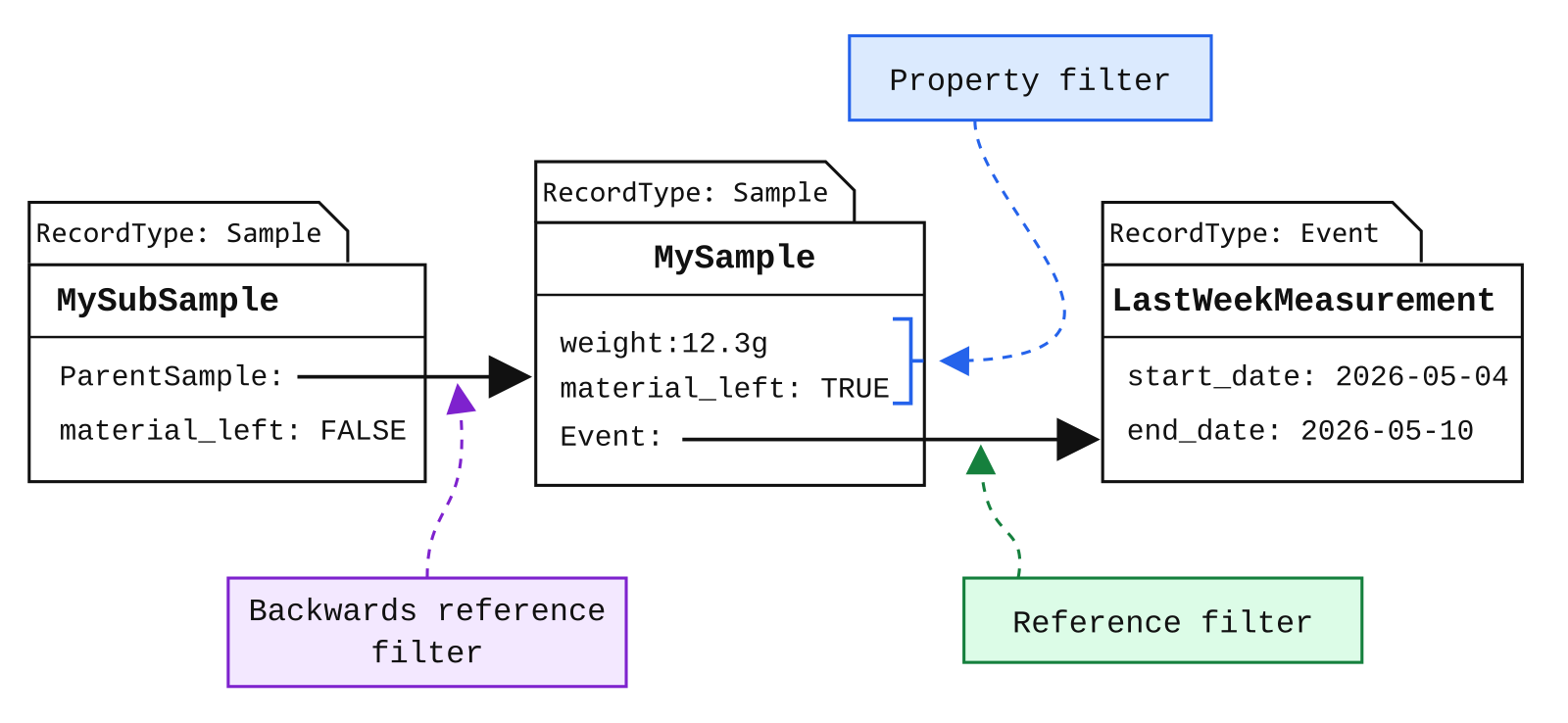
The three filter types, for the example query.#