
Standard Converters#
Note
This page has been migrated from the old documentation, and has not yet been fully revised. There might be inconsistencies or errors when using with current LinkAhead versions.
These are the standard converters that exist in a default installation. For writing and applying custom converters, see their documentation.
Directory Converter#
The Directory Converter creates StructureElements for each File and Directory inside the current Directory. You can match a regular expression against the directory name using the ‘match’ key.
With the optional match_newer_than_file key, a path to a file containing only an ISO-formatted
datetime string can be specified. If this is done, a directory will only match if it contains at
least one file or directory that has been modified since that datetime. If the file doesn’t exist
or contains an invalid string, the directory will be matched regardless of the modification times.
Simple File Converter#
The Simple File Converter does not create any children and is usually used if a file shall be used as it is and be inserted and referenced by other entities.
Markdown File Converter#
Reads a YAML header from Markdown files (if such a header exists) and creates children elements according to the structure of the header.
DictElement Converter#
DictElement → StructureElement
Creates a child StructureElement for each key in the dictionary. The following StructureElement types are typically created by the DictElement converter:
BooleanElement
FloatElement
TextElement
IntegerElement
ListElement
DictElement
Note that you may use TextElement for anything that exists in a text format that can be
interpreted by the server, such as date and datetime strings in ISO-8601 format.
match_properties#
match_properties is a dictionary of key-regexps and value-regexp pairs and can be used to match
direct properties of a DictElement. Each key matches a property name and the
corresponding value matches its property value.
Example: ……..
{
  "@type": "PropertyValue",
  "additionalType": "str",
  "propertyID": "testextra",
  "value": "hi"
}
When applied to a dict loaded from the above json, a DictElementConverter with the following
definition:
Example:
  type: DictElement
  match_properties:
    additionalType: (?P<addt>.*)$
    property(.*): (?P<propid>.*)$
will match and create two variables:
addt = "str"propid = "testextra"
Scalar Value Converters#
BooleanElementConverter, FloatElementConverter, TextElementConverter, and
IntegerElementConverter behave very similarly.
These converters expect match_name and match_value in their definition which allow to match the
key and the value, respectively.
Note that there are defaults for accepting other types. For example, FloatElementConverter also
accepts IntegerElements. The default behavior can be adjusted with the fields accept_text,
accept_int, accept_float, and accept_bool.
The following denotes what kind of StructureElements are accepted by default (they are defined
in src/caoscrawler/converters.py):
BooleanElementConverter: bool, int
FloatElementConverter: int, float
TextElementConverter: text, bool, int, float
IntegerElementConverter: int
ListElementConverter: list
DictElementConverter: dict
YAMLFileConverter#
A specialized converter for yaml files: Yaml files are opened and the contents are converted into dictionaries, which then can be further converted using the typical subtree converters of DictElementConverter.
TableConverter#
Table → DictElement
A generic converter (abstract) for files containing tables. Currently, there are two specialized implementations for XLSX files and CSV files.
All table converters generate a subtree of dicts, which in turn can be converted with DictElementConverters: For each row in the table the TableConverter generates a DictElement (structure element). The key of the element is the row number. The value of the element is a dict containing the mapping of column names to values of the respective cell.
Example:
subtree:
  TABLE:  # Any name for the table as a whole
    type: CSVTableConverter
    match: ^test_table.csv$
    records:
      (...)  # Records edited for the whole table file
    subtree:
      ROW:  # Any name for a data row in the table
        type: DictElement
        match_name: .*
        match_value: .*
        records:
          (...)  # Records edited for each row
        subtree:
          COLUMN:  # Any name for a specific type of column in the table
            type: FloatElement
            match_name: measurement  # Name of the column in the table file
            match_value: (?P<column_value).*)
            records:
              (...)  # Records edited for each cell
XLSXTableConverter#
XLSX File → DictElement
The converter definition in the CFood can include options matching the parameters of
pandas.read_excel.
These include sheet_name, header, names, index_col, usecols, true_values,
false_values, na_values, parse_dates, skiprows, nrows, and keep_default_na.
Example:
subtree:
  TABLE:  # Any name for the table as a whole
    type: XLSXTableConverter
    match: ^test_table.xlsx$
    header: 3
    skip_rows: 2
In addition, the class can be used for validation and error handling. In order to do so, you must
provide the desired datatypes for columns in the converters section. For example, the following
will convert the values in the author column to string, and the values from the publications
column to integer, raising an exception if this is not possible:
subtree:
  TABLE:  # Any name for the table as a whole
    type: XLSXTableConverter
    match: ^test_table.xlsx$
    converters:
       "author": "str"
       "publications": "int"
The supported datatypes for conversion are: int, float, str, date, time, datetime, and
bool.
Apart from converters, you can specify columns which must have valid values for each row in
obligatory_columns, columns which must exist but may have missing values in existing_columns,
and lists of column names which in combination uniquely identify each row in unique_keys.
CSVTableConverter#
CSV File → DictElement
PropertiesFromDictConverter#
The PropertiesFromDictConverter is a specialization
of the DictElementConverter and offers all its
functionality. It is meant to operate on dictionaries (e.g., from reading in a json or a table
file), the keys of which correspond to properties in a LinkAhead datamodel. This is especially
useful in cases where properties may be added to the data model and data sources that are not yet
known when writing the CFood definition.
The definition of the PropertiesFromDictConverter
has an additional required entry record_from_dict which specifies the Record to which the
properties extracted from the dict will be attached to. This Record is identified by its
variable_name, by which it can then also be referred to further down the subtree. You can also use
the name of a Record that was specified earlier in the CFood definition in order to extend it by the
properties extracted from a dict. Let’s have a look at a simple example. The CFood definition:
PropertiesFromDictElement:
    type: PropertiesFromDictElement
    match: ".*"
    record_from_dict:
        variable_name: MyRec
        parents:
        - MyType1
        - MyType2
applied to a dictionary
{
  "name": "New name",
  "a": 5,
  "b": ["a", "b", "c"],
  "author": {
    "full_name": "Silvia Scientist"
  }
}
will create a Record New name with parents MyType1 and MyType2. It
has a scalar property a with value 5, a list property b with values “a”, “b” and “c”, and an
author property which references an author with a full_name property with the value
“Silvia Scientist”:
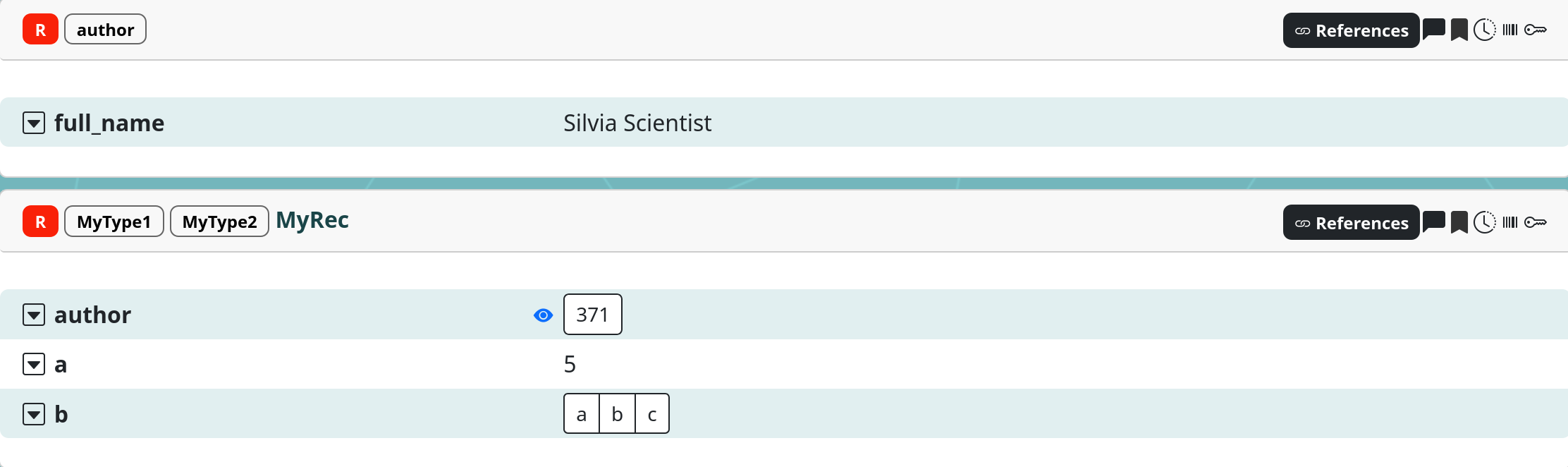
Note how the different dictionary keys are handled differently depending on their types: scalar and
list values are understood automatically, and a dictionary-valued entry like author is translated
into a reference to an author Record automatically.
You can further specify how references are treated with an optional references key in
record_from_dict. Let’s assume that in the above example, we have an author Property with
datatype Person in our data model. We could add this information by extending the above example
definition by:
PropertiesFromDictElement:
    type: PropertiesFromDictElement
    match: ".*"
    record_from_dict:
        variable_name: MyRec
        parents:
        - MyType1
        - MyType2
        references:
            author:
                parents:
                - Person
so that now, the Person Record with full_name “Silvia Scientist” is created as the value of the
author property:
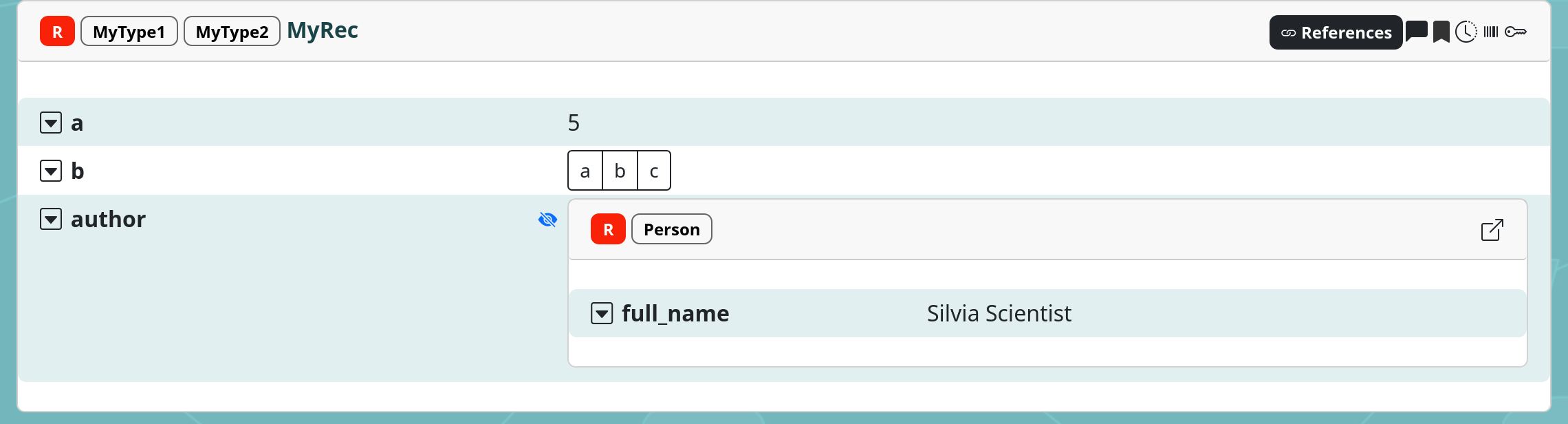
For the time being, only the parents of the referenced Record can be set via this option. More
complicated treatments can be implemented via the referenced_record_callback (see below).
All keys listed under properties_blacklist will be excluded from automated treatment, which means
it can be used to exclude properties from being automatically created. Since the
PropertiesFromDictConverter has all the functionality
of the DictElementConverter, individual properties
can still be used in a subtree. Together with properties_blacklist, this can be used to add custom
treatment to specific properties by blacklisting them in record_from_dict and then treating them
in the subtree the same as you would do it in the standard
DictElementConverter. Note that the excluded keys are
excluded on all levels of the dictionary, which means this applies also when they occur in a
referenced entity.
For further customization, the
PropertiesFromDictConverter can be used as a basis
for custom converters, which can use its referenced_record_callback
argument to add custom handling of references. The referenced_record_callback can be a callable
object which takes exactly a Record as an argument and needs to return that Record after applying
its treatment. Additionally, it is given the RecordStore and the ValueStore in order to be able
to access the records and values that have already been defined from within
referenced_record_callback. This might look like the following:
def my_callback(rec: db.Record, records: RecordStore, values: GeneralStore):
    # do something with rec, possibly using other records or values from the stores...
    rec.description = "This was updated in a callback"
    return rec
This function is applied to all Records that are created from the dictionary. This means it can be
used to, for example, transform values of some properties, or add special treatment to all Records
of a specific type. referenced_record_callback is applied after the properties from the
dictionary have been applied as explained above.
XML Converters#
There are the following converters for XML content:
XMLFileConverter#
This is a converter that loads an XML file and creates an XMLElement containing the root element of the XML tree. It can be matched in the subtree using the XMLTagConverter.
XMLTagConverter#
The XMLTagConverter is a generic converter for XMLElements with the following main features:
It allows to match a combination of tag name, attribute names and text contents using the keys:
match_tag: regular expression, default empty stringmatch_attrib: dictionary of key and value pairs, both containing regular expressions. Each key matches an attribute name and the corresponding value matches its attribute value.match_text: regular expression, default empty string
It allows to traverse the tree using XPath (using Python lxml’s xpath functions):
The key
xpathis used to set the xpath expression and has a default ofchild::*. Its default would generate just the list of sub nodes of the current node. The result of the xpath expression is used to generate structure elements as children. It them uses the keystags_as_children,attribs_as_childrenandtext_as_childrento determine which information from the found nodes will be used as children:tags_as_children: (defaulttrue) For each xml tag element found by the xpath expression, generate one XMLTag structure element. Its name is the full path to the tag using the functiongetelementpathfromlxml.attribs_as_children: (defaultfalse) For each xml tag element found by the xpath expression, generate one XMLAttributeNode structure element for each of its attributes. The attribute node’s name has the form:<full path of the tag>@<name of the attribute>.text_as_children: (defaultfalse) For each xml tag element found by the xpath expression, generate one XMLTextNode structure element containing the text content of the tag element. Note that in case of multiple text elements, only the first one is added. The name of the respective attribute node has the form:<full path of the tag> /text()to the tag using the functiongetelementpathfromlxml.
Note
Currently, there is no converter implemented that can match XMLAttributeNodes.
Namespaces#
The default is to use the namespace map from the current node in xpath queries. Because default
namespaces cannot be handled by xpath, it is possible to remap the default namespace using the key
default_namespace. The key nsmap can be used to define additional nsmap entries.
ZipFileConverter#
This converter opens zip files, unzips them into a temporary directory and exposes the contents as File structure elements.
Usage Example:#
ExampleZipFile:
  type: ZipFile
  match: example\.zip$
  subtree:
    DirInsideZip:
      type: Directory
      match: experiments$
    FileInsideZip:
      type: File
      match: description.odt$
This converter will match and open files called example.zip. If the file contains a directory
called experiments or a file called description.odt, they will be processed further by the
respective converter in the subtree.