
Crawler Tutorial: Scientific Folder Structure#
Note
This page has been migrated from the old documentation, and has not yet been fully revised. There might be inconsistencies or errors when using with current LinkAhead versions.
The SciFolder structure#
Let’s walk through a more elaborate example of using the LinkAhead Crawler, this time making use of a simple directory structure. We assume the directory structure to have the following form:
ExperimentalData/

  2022_ProjectA/

    2022-02-17_TestDataset/
      file1.dat
      file2.dat
      ...
    ...

  2023_ProjectB/
    ...
  ...
This file structure is described in the article “Guidelines for a Standardized Filesystem Layout for Scientific Data” (https://doi.org/10.3390/data5020043). As a simplified example we want to write a crawler that creates “Project” and “Measurement” records in LinkAhead and set some reasonable properties stemming from the file and directory names. Furthermore, we want to link the data files to the measurement records.
Let’s first clarify the terms we are using:
ExperimentalData/            <--- Category level (level 0)
  2022_ProjectA/             <--- Project level (level 1)
    2022-02-17_TestDataset/  <--- Activity / Measurement level (level 2)
      file1.dat              <--- Files on level 3
      file2.dat
      ...
    ...
  2023_ProjectB/    <--- Project level (level 1)
    ...
  ...
So we can see that this follows the three-level folder structure described in the paper. We use the term “Activity level” here, instead of the terms used in the article, as it can be used in a more general way.
A CFood for SciFolder#
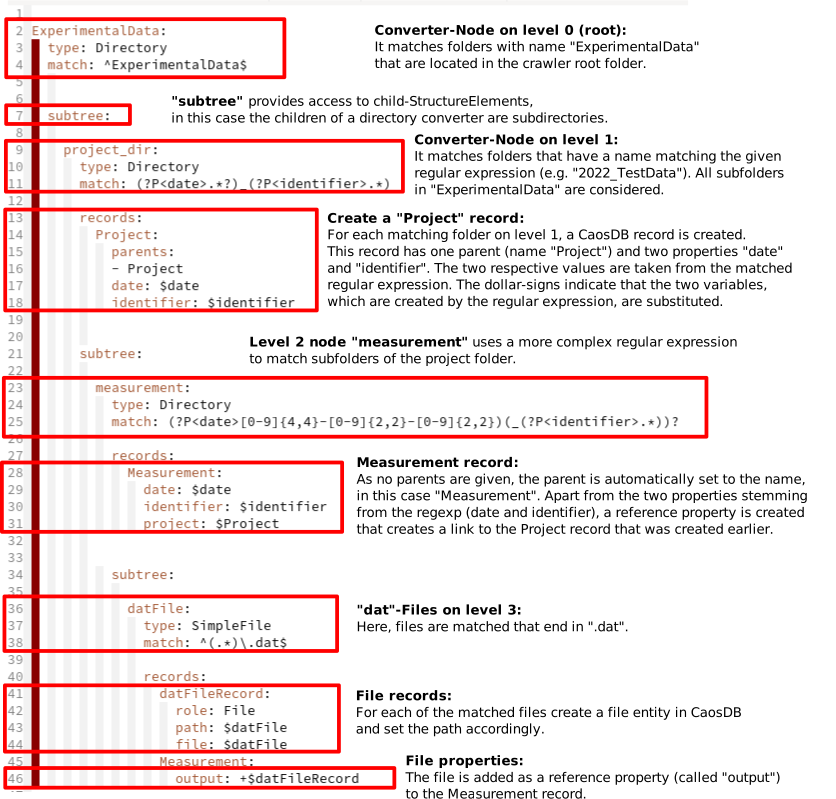
The following YAML CFood is able to match and insert / update the records accordingly, with a detailed explanation of the YAML definitions:
See for yourself#
If you want to try this out for yourself, you will need the following content:
Data files in a SciFolder structure.
A data model which describes the data.
An identifiables definition which describes how data Entities can be identified.
A CFood definition which the crawler uses to map from the folder structure to entities in LinkAhead.
You can download all the necessarily files, packed in
scifolder_tutorial.tar.gz. After storing this archive
file, unpack it and go into the scifolder directory, then follow these steps:
Copy the data files folder to the
extrootdirectory of your LinkAhead installation:cp -r scifolder_data ../../<your_extroot>/.Load the content of the data folder into LinkAhead:
python -m caosadvancedtools.loadFiles /opt/caosdb/mnt/extroot/scifolder_data.The path to loadfiles is the one that the LinkAhead server sees, which is not necessarily the same as the one on your local machine. The prefix
/opt/caosdb/mnt/extroot/is correct for all LinkAhead instances. If you are in doubt, please ask your administrator for the correct path.For more information on
loadFiles, callpython -m caosadvancedtools.loadFiles --help.Note
If the Records that are created will be referenced by LinkAhead File Entities, you (currently) need to make them accessible in LinkAhead in advance. For example, this applies if you have a folder with data files, and you want those files to be referenced by an Experiment Record.
Teach the server about the data model:
python -m caosadvancedtools.models.parser model.yml --syncRun the crawler on the local
scifolder_datafolder, using the identifiables and CFood definition files:caosdb-crawler -s update -i identifiables.yml scifolder_cfood.yml scifolder_data