
The LinkAhead Crawler#
Note
This page has been migrated from the old documentation, and has not yet been fully revised. There might be inconsistencies or errors when using with current LinkAhead versions.
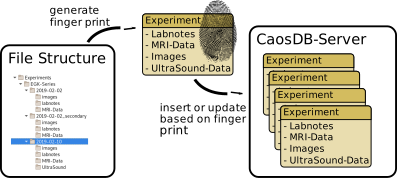
The LinkAhead Crawler is an independent software component belonging to the LinkAhead system. Its main task is integrating data from hierarchical file structures (like hard disks or network drives) into LinkAhead.
Note
The software is described in detail in a scientific article:
tom Wörden, H.; Spreckelsen, F.; Luther, S.; Parlitz, U.; Schlemmer, A.
Mapping Hierarchical File Structures to Semantic Data Models for Efficient Data Integration into Research Data Management Systems. Data 2024, 9, 24. doi.org/10.3390/data9020024
This document briefly introduces the concepts of the crawler and describes its functionality.
Project Structure#
The LinkAhead Crawler is a Python package that is independent of the main LinkAhead software.
Source code repository: gitlab.indiscale.com/caosdb/src/caosdb-crawler
Crawler extensions (CFoods and Custom Converters) can be found in a separate repository:
Crawler extension repository: gitlab.indiscale.com/caosdb/src/crawler-cfoods
The data integration procedure of the Crawler#
The Crawler carries out the data integration in two separate steps:
Scanning
Synchronization
The crawler can be considered the main program doing the synchronization in basically two steps:
Based on a yaml-specification (CFoods) scan the file system (or other sources) and create a set of LinkAhead Entities that are supposed to be inserted or updated in a LinkAhead instance.
Compare the current state of the LinkAhead instance with the set of LinkAhead Entities created in step 1, taking into account the registered identifiables. Insert or update entities accordingly.
CFoods#
The configuration that is used by the crawler to
identify information that is supposed to be integrated into LinkAhead and
map information to LinkAhead Records
is stored in YAML (https://en.wikipedia.org/wiki/YAML) files. We call these yaml files CFoods.
The CFood consists of three separate parts:
Metadata and macro definitions
Custom converter registrations
The converter tree specification
The YAML file should be composed of two YAML documents and have the following generic structure:
---
metadata:
  name: # Name of the CFood
  description: # Description of the CFood
  crawler-version: # Minimum crawler version needed for running the CFood
  macros:
    # Macro definitions
    # (...)
---
Converters:
  # Definition of custom converters used by this CFood
  # (...)

# Actual definition of the file hierarchy starts here
# (...)
The actual definition of the file hierarchy in a CFood is a tree of Converter definitions with the following pattern:
NameOfConverter_1:
  param_1: value_1
  param_2: value_2
  # (...)
  subtree:
    NameOfSubtreeConverter_1:
      param_1: value_1
      param_2: value_2
      # (...)

NameOfConverter_2:
  param_1: value_1
  param_2: value_2
  # (...)
Please refer to the tutorial on CFoods for examples.
A typical yaml definition will look like this:
<NodeName>:
  type: <ConverterName>
  match: ".*"
  records:
    Experiment1:
      parents:
        - Experiment
        - Blablabla
      date: $DATUM
      (...)
    Experiment2:
      parents:
        - Experiment
  subtree:
    (...)
The <NodeName> is a description of what the current block represents (e.g. experiment-folder)
and is used as an identifier.
<type> selects the converter that is going to be matched against the current structure element.
If the structure element matches (this is a combination of a typecheck and a detailed match, see the
Converter source documentation for details), the
converter will:
generate records (with
create_records())process a subtree (with
create_children())
records is a dict of definitions that define the semantic structure (see details below).
subtree makes the yaml recursive: It contains a list of new Converter definitions, which work on the StructureElements that are returned by the current Converter.
Structure Elements#
The crawled hierarchical structure is represented by a tree of StructureElements. This tree is
generated on the fly by so-called Converters which are defined in a yaml file (usually called
cfood.yml). This generated tree of StructureElements is a model of the existing data. For example
a tree of Python file objects (StructureElements) could correspond to a file system tree.
Converters#
Converters treat a StructureElement and during this process create a number of new StructureElements: the children of the initially treated StructureElement. Thus by treatment of existing StructureElements, Converters create a tree of StructureElements.
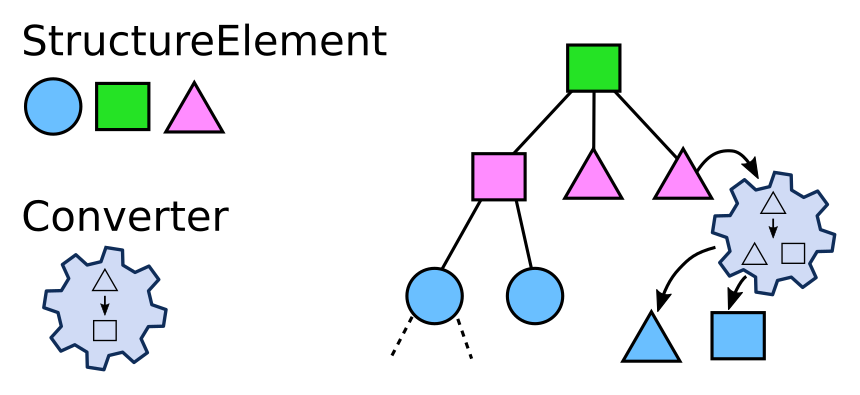
Each StructureElement in the tree has a set of properties, organized as key-value pairs. Some of
those properties are specified by the type of StructureElement. For example, a file could have the
file name as property: 'filename': myfile.dat. Converters may define additional functions that
create further values. For example, a regular expression could be used to get a date from a file
name.
See the chapter Converters for details.
Custom Converters#
Custom converters allow the integration of custom python code as a converter in the LinkAhead
Crawler. In order to be recognized by the crawler, the package containing the custom code must be
available in the path of the interpreter running the crawler. This can be achieved by installing the
package into the same virtual environment as the crawler itself. Furthermore, the code must be
integrated in a subclass of the class Converter.
The registration of custom converters in the CFood is done as follows:
CustomConverters:
  CustomConverter_1: # A name that can be used within the CFood for using the custom converter
    package: mypackage.converters  # The Python module containing the custom converter class
    converter: CustomConverter1    # The name of the custom converter class
  CustomConverter_2:
    package: mypackage.converters
    converter: CustomConverter2
Please refer to the tutorial on custom converters for details.
Macros#
Please refer to the tutorial on macros.
Transform Functions#
Please refer to the tutorial on transform functions.
Identifiables#
An Identifiable of a Record is like the fingerprint of a Record.
The Identifiable contains the information that is used by the LinkAhead Crawler to identify Records. For example, the LinkAhead Crawler may create a query using the information contained in the Identifiable in order to check whether a Record exists in the LinkAhead Server.
Suppose a certain experiment is at most done once per day, then the identifiable could consist of the RecordType “SomeExperiment” (as a parent) and the Property “date” with the respective value.
You can think of the properties that are used by the identifiable as a dictionary. For each property name there can be one value. However, this value can be a list such that the created query can look like “FIND RECORD ParamenterSet WITH a=5 AND a=6”. This is meaningful if there is a ParamenterSet with two Properties with the name ‘a’ (multi property) or if ‘a’ is a list containing at least the values 5 and 6.
When we use a reference Property in the identifiable, we effectively use the reference from the object to be identified pointing to some other object as an identifying attribute. We can also use references that point in the other direction, i.e. towards the object to be identified. An identifiable may denote one or more Entities that are referencing the object to be identified.
The path of a File object can serve as a Property that identifies files and similarly the name of Records can be used.
In the current implementation an identifiable can only use one RecordType even though the identified Records might have multiple Parents.
Registered Identifiables#
A Registered Identifiable is the blueprint for Identifiables. You can think of registered identifiables as identifiables without concrete values for properties. RegisteredIdentifiables are associated with RecordTypes and define of what information an identifiable for that RecordType exists. There must not be multiple Registered Identifiables for one RecordType.
If identifiables shall contain references to the object to be identified, the Registered Identifiable must list the RecordTypes of the Entities that have those references. For example, the Registered Identifiable for the “Experiment” RecordType may contain the “date” Property and “ Project” as the RecordType of an Entity that is referencing the object to be identified. Then if we have a structure of some Records at hand, we can check whether a Record with the parent “Project” is referencing the “Experiment” Record. If that is the case, this reference is part of the identifiable for the “Experiment” Record. Note, that if there are multiple Records with the appropriate parent ( e.g. multiple “Project” Records in the above example) it will be required that all of them reference the object to be identified. You can also use the wildcard “*” as RecordType name in the configuration which will only require, that ANY Record references the Record at hand.
Instead of defining registered identifiables for a RecordType directly, they can be defined for their parents. I.e., if there is no registered identifiable for a RecordType, then it will be checked whether there is a parent that has one. If multiple recordtypes exist in the inheritance chain with a registered identifiable, then the one that is closest to the direct parent is used. In case of multiple inheritance, only one branch must have registered identifiables.
The reason for this behavior is the following. If there were multiple registered identifiables that could be used to identify a given record and only a single one of them was used, it might be that the existence check returns a different result than if the other one would be used. This would allow for unpredictable and inconsistent behavior (Example: one registered identifiable contains the name another one property date. Using the name might imply that the record does not exist and using the date might imply that it does. Thus, for any Record the registered identifiable must be unique). Analogous Example: If you think in the context of relational databases, there can always only be a foreign key associated with one table.
Note
In case of using the registered identifiable of a parent, the identifiable will be created by using the parent RecordType. Example: The registered identifiable is defined for the parent “Experiment” and the RecordType at hand “LaseExperiment” is a child of “Experiment”. Then the identifiable will construct a query that searches for “Experiment” Records (and not “LaseExperiment” Records).
Variables#
Variable Precedence#
Let’s assume the following situation
description:
  type: DictTextElement
  match_value: (?P<description>.*)
  match_name: description
Making use of the $description variable could refer to two different variables created here:
The structure element path.
The value of the matched expression.
The matched expression does take precedence over the structure element path and shadows it.
Make sure, that if you want to be able to use the structure element path, to give unique names to the variables like:
description_text_block:
  type: DictTextElement
  match_value: (?P<description>.*)
  match_name: description
Scopes#
Example:
DicomFile:
  type: SimpleDicomFile
  match: (?P<filename>.*)\.dicom
  records:
    DicomRecord:
      name: $filename
  subtree:  # header of dicom file
    PatientID:
      type: DicomHeaderElement
      match_name: PatientName
      match_value: (?P<patient>.*)
      records:
        Patient:
          name: $patient
          dicom_name: $filename  # $filename is in same scope!
ExperimentFile:
  type: MarkdownFile
  match: ^readme.md$
  records:
    Experiment:
      dicom_name: $filename  # does NOT work, because $filename is out of scope!
Caching#
The Crawler uses the cached library function cached_get_entity_by. The cache is cleared
automatically when the Crawler does updates, but if you ran the same Python process indefinitely,
the Crawler would not see changes in LinkAhead due to the cache. Thus, please make sure to clear the
cache if you create long-running Python processes.
Further reading#
A simple documented example which demonstrates the crawler usage.
Some useful examples can be found in the integration tests (and to a certain extent in the unit tests).