
Tags: developer, explanation

MariaDB Backend#

Note

This page has been migrated from the old documentation, and has not yet been fully revised. There might be inconsistencies or errors when using with current LinkAhead versions.

The MariaDB backend in CaosDB may be substituted by other backends, but at the time of writing this documentation, only MariaDB (often still named MySQL in the sources) is implemented. There are the following main packages which handle the backend:

backend.interfaces

Interfaces which backends may implement. The main method for most interfaces is execute(...) with arguments depending on the specific interface, and benchmarking methods (getBenchmark() and setTransactionBenchmark(b) may also be required.

backend.implementation.MySQL

MySQL implementations of the interfaces. Typical “simple” implementations create a prepared SQL statement from the arguments to execute(...) and send it to the SQL server. They may also have methods for undoing and cleanup, using an UndoHandler.

backend.transaction

Subclasses of the abstract BackendTransaction which implement the execute() method. These classes may use specific backend implementations (like for example the MySQL implementations) to interact with the backend database.

For example, the structure when getting an Entity ID by name looks like this:
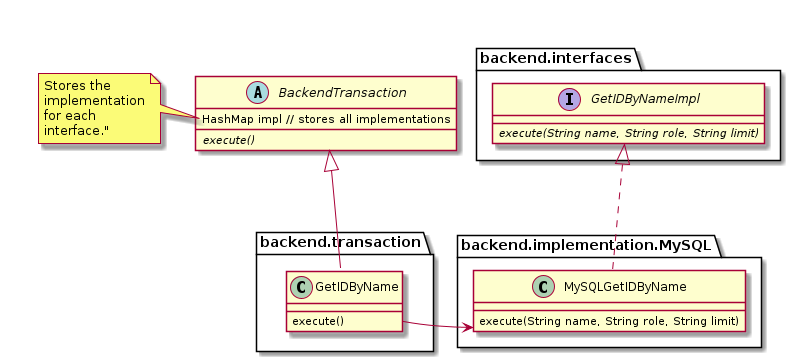
@startuml
together {
  abstract BackendTransaction {
    HashMap impl // stores all implementations
    {abstract} execute()
  }
  note left of BackendTransaction::impl
    Stores the
    implementation
    for each
    interface."
  end note
  package "backend.interfaces" {
    interface GetIDByNameImpl {
      {abstract} execute(String name, String role, String limit)
    }
  }
}
together {
  package "backend.transaction" {
    class GetIDByName extends BackendTransaction {
      execute()
    }
  }
  package "backend.implementation.MySQL" {
    class MySQLGetIDByName implements GetIDByNameImpl {
      execute(String name, String role, String limit)
    }
  }
}

GetIDByName::execute --r-> MySQLGetIDByName
@enduml

Mapping of Objects to Database Tables#

Mapping Entities with deep Properties#

Understanding the problem#

In LinkAhead, Properties of Entities can have subproperties, or they may overwrite default datatypes of abstract Properties. The SQL representation of simple properties is a row in a data table. For example (simplified):

domain_id

entity_id

property_id

value

0

413

230

V1

But how can we store a subproperty of the Property 230 with value V1? For example, how to store that the datatype of this Property is different?

To understand LinkAhead’s approach, it makes sense to imagine entities and their properties as a tree: At the root of the tree, there is the base entity. Each “simple” property is a branch connected to the entity, and sub-properties are connected to their base property. Properties that do not have any sub-properties on their own are leaf nodes in the tree.

Now the SQL representation of this property tree consists of two parts:

  • The property_id and value columns describe the kind of property and of course the value.

  • All the other columns describe where this property can be found:

    • “Direct” properties, i.e. those at the base of the tree (level 1), have domain_id=0 and the entity_id of their corresponding entity.

    • Sub-properties of direct properties (level 2) use the entity’s ID as domain_id.

    • Everything below level 2 needs a new way of denoting their place in the property tree, and that is where replacement properties come into play.

Simple examples#

Two simple examples, which can be represented without replacement properties:

This entity with a text property (id=230)

<Entity id=413>
    <Property id=230>
        <value>V1</value>
    <Property/>
</Entity>

has no subproperties and thus will be represented in the text_data table as

domain_id

entity_id

property_id

value

status

0

413

230

V1

FIX

If the property has a subproperty 231:

<Entity id=413>
    <Property id=230>
        <value>V1</value>
        <Property id="231">
            <value>V2</value>
        </Property>
    <Property/>
</Entity>

the following will be stored in:

domain_id

entity_id

property_id

value

status

0

413

230

V1

FIX

413

230

231

V2

FIX

This shows that the subproperty is stored using the identifiers (413,230) as domain and entity ID. This allows to identify the property to which this subproperty belongs when retrieving data.

Representing deep Properties with replacements#

In order to represent Properties that have no simple row-like representation in the *_data SQL tables (due to subproperties or an override), replacement helper objects are used (ReplacedProperty class in the Java code).

Whenever a Property cannot be represented directly, this property’s value is replaced by a replacement, which is represented similar to an Entity in SQL. The Property’s value is now stored in the reference_data table as a reference to the replacement and all the actual data is attached to the replacement.

Every replacement (non-leaf node in the graph model above) gets an ID that is within-graph-unique, i.e. no two replacements within a given entity tree have the same ID.

Each replacement results in two rows in the data tables:

  1. ID in the reference_data table: The triple entity_id - property_id - id of the replacement property is added here.

  2. Value in the corresponding *_data table: The actual property value is added in a scope specific to this replacement:

    • domain_id: The base entity’s ID.

    • entity_id: The replacement ID.

    • value: The original property value.

../../_images/replacements.png

Sub-property example in Python#

To reproduce the examples above, here’s some Python code:

import linkahead as db; db.Info()

# Create the properties
sub_p = db.Property("subprop", datatype=db.TEXT)
test_p = db.Property("testprop", datatype=db.TEXT)
sub_p.insert()
test_p.insert()

# Create a recordtype
TestRT = db.RecordType("TestRT").add_property(test_p)
TestRT.insert()

# Create the entity and add property
test_rec = db.Record().add_parent(TestRT)
test_rec.add_property(test_p, value="V1")
prop = test_rec.properties[0].add_property(sub_p, value="V2")
my_subp = prop.properties[0]
my_subp.add_property(sub_p, value="V3")
test_rec.insert()

# Look at the data
print(test_rec)
# The output looks similar to this (printed in reduced form and reformatted here):
# <Record id="123">
#   <Parent id="122" name="TestRT" flag="inheritance:NONE,"/>
#   <Property id="121" name="testprop" datatype="TEXT" importance="FIX" flag="inheritance:FIX">
#     V1
#     <Property id="120" name="subprop" datatype="TEXT" importance="FIX" flag="inheritance:FIX">
#       V2
#       <Property id="120" name="subprop" datatype="TEXT" importance="FIX" flag="inheritance:FIX">
#         V3
#       </Property>
#     </Property>
#   </Property>
# </Record>
print(test_rec.id)
# In the browser, look at https://localhost:10443/Entity/123 if "123" is the ID.
#
# or run this to look at the SQL database directly:
# > docker exec -ti linkahead mariadb -h sqldb -u caosdb -prandom1234 caosdb
# > SELECT * FROM text_data WHERE value LIKE 'V%';
# +-----------+-----------+-------------+------------------+--------+------+
# | domain_id | entity_id | property_id | value            | status | pidx |
# +-----------+-----------+-------------+------------------+--------+------+
# |         0 |       123 |         122 | V1               | FIX    |    0 |
# |         0 |       123 |         113 | V2               | FIX    |    0 |
# |       123 |       113 |         121 | V3               | FIX    |    0 |
# +-----------+-----------+-------------+------------------+--------+------+
# > SELECT * FROM reference_data ORDER BY entity_id DESC LIMIT 10;
# +-----------+-----------+-------------+-------+-------------+------+----------------+
# | domain_id | entity_id | property_id | value | status      | pidx | value_iversion |
# +-----------+-----------+-------------+-------+-------------+------+----------------+
# |       123 |       122 |         121 |   113 | REPLACEMENT |    0 |           NULL |
# +-----------+-----------+-------------+-------+-------------+------+----------------+

A more complex example, with replacement properties#

This more complex example requires replacement properties:

<Record id="413">
    <Parent id="999"/>
    <Property id="230" >
        <value>V1</value>
        <Property id="230" >
            <value>V2</value>
            <Property id="230">
                <value>V3</value>
                <Property id="230" >
                    <value>V4</value>
                </Property>
            </Property>
            <Property id="230" >
                <value>V3b</value>
            </Property>
        </Property>
        <Property id="230" >
            <value>V2b</value>
        </Property>
    </Property>
    <Property id="230" >
        <value>V1b</value>
    </Property>
</Record>

The tables will have the following rows:

text_data table:

domain_id

entity_id

property_id

value

status

0

413

113

V1

FIX

0

413

114

V2

FIX

0

413

138

V3

FIX

0

413

230

V1b

FIX

413

113

230

V2b

FIX

413

114

230

V3b

FIX

413

138

230

V4

FIX

reference_data table:

domain_id

entity_id

property_id

value

status

0

413

230

113

REPLACEMENT

413

113

230

114

REPLACEMENT

413

114

230

138

REPLACEMENT

You can see that all non-leaf nodes/properties are added directly to the entity scope (0,413). In case the property was replaced, the property_id is the replacement ID (see first row, property_id=113). This means that the corresponding value of the property (e.g. V2 in second row) is added to the replacement property when reading the data. I.e. the entity with ID 413 does not have a property with value V2, but one of the subproperties does. The subproperties are stored in the scope of their replacement parent (e.g. (413,113) for V2b).

This replacement strategy is also used in other cases where now row representation is possible, e.g. when the datatype of a property is overwritten.

The real_property_id column#

Because the property_id column may contain the ID of a replacement, it is not obvious, what the ID of the Property at the Record is when looking at such a row in the data table. Therefore, there is an additional column with redundant information to simplify things and to speed up lookups: The real_property_id column. It always contains the ID of the Property of the Record, never the ID of a potential replacement entity.

In the example above, the first rows of the text_data table with the real_property_id column:

domain_id

entity_id

property_id

real_property_id

value

status

0

413

113

230

V1

FIX

0

413

114

230

V2

FIX

0

413

138

230

V3

FIX

0

413

230

230

V1b

FIX

The IDs 113, 114 and 138 belong to replacements, thus the real_property_id shows a different ID. In the fourth line, real_property_id is simply the same as property_id.